Eltima SWF to FLA Converter for MacOS Publisher Review:
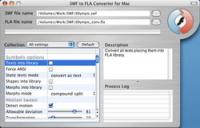
Convert Flash into FLA format in one click with SWF to FLA Converter for Mac. In expert mode there are over 50 options to customize Fla timeline and resulting file workspace, group objects into libraries, adjust ActionScript conversion settings, etc.
Eltima SWF to FLA Converter for Mac OS is the only Flash software on the net for Mac OS users, that lets Flash designers convert SWF files back into FLA format in a few mouse clicks. It presents user with an arsenal of profound algorithms to extract all Flash objects from SWF file. Extracted objects can be edited in native Flash environment, which is very convenient when working with Flash. Every group of objects such as morphs, shapes, texts, fonts, motions, sounds, ActionScripts, etc. could be placed in separate FLA library groups, which makes it easier to use and view the resulting FLA file. Every FLA library can be saved into a different folder under a specified name. Additionally, you can customize FLA file workspace by enabling/disabling guides, grids, rulers; specify guides accuracy and so on. To make sure that masks layers are working properly, every morph or shape can be placed on different layers. Forgotten passwords to your SWF file are not a problem any longer with SWF to FLA Converter. While decompiling SWF file resources the application bypasses this protection mechanism. Once you have converted your SWF into FLA you can set new protection in your favorite Flash editor. SWF to FLA Converter is the only Mac OS tool to export the whole SWF movie in FLA format that supports Flash MX and ActionScript 2.0. Restore your lost original FLA files from available SWF files using Eltima's SWF to FLA Converter for Mac, thus saving you time and efforts to develop or modify your Flash movies. You can easily change Flash objects, modify text or hyperlink, replace sounds, images, etc. and convert it back to SWF file.
Whats new in version 1.1: The only converter from SWF file to FLA for Mac OS;
Expert and Simple program interfaces;
Over 50 options to extract sounds, images, videos, shapes, frames, morphs, fonts, texts, buttons, sprites and ActionScripts with great accuracy;
Ability to extract every object into a separate layer;
Group SWF objects (text/motion/sound/ActionScripts, etc.) into a separate library entry for better representation;
Specify folder's name for each FLA library;
Sophisticated morphs conversion algorithms are supported to ensure that all frames are correctly extracted;
Extracts Flash objects from protected SWF files;
Customize resulting FLA project - enable/disable grids, guides, advanced snapping options, etc.;
On-screen detailed conversion parameters description;
Professionally selected default conversion settings; Requirements: Mac OS 10.3 and higher Operating system: Mac OS X,Mac Other Limitations: Graphics are stored in grayscale format; ActionScrips are not decompiled Release notes: New Release
U.S. interactive map for embedding into websites. State and county selection. Useful for real estate websites. FLA source files included.
Price: $199, Rating: 5, Downloads: 110 Download
Make Web and Flash Animations, animated Avatars from 3D Models. Dress up avatars, create faces, expressions, motions, 3D environments, lights, cameras. Graphics and script output. > 1000 items, easily expandable, Add Packages, Import 3DS and X files
Price: $99.00, Rating: 6, Downloads: 108 Download
HTML, DHTML, CSS, JavaScript, and Flash tutorials: written in plain english and easy to understand.
You've come to the right place. Look no further...
Price: $11.50, Rating: 9.67, Downloads: 93 Download
FDesk e-Publisher converts a static PDF file into flip page e-publication in minutes. You can also create a flip album by importing a series of JPG files. The result can be posted on any server, or run as a standalone e-edition on many media.
Price: $30, Rating: 9, Downloads: 85 Download
toKaos is a desktop software application which allows you to encrypt/obfuscate your Flash/Flex AS3 application protecting your work from SWF/SWC decompilers. After the process you can compile and deploy your product (Encrypted SWF or Encrypted SWC).
Price: $150, Rating: 5, Downloads: 70 Download
User Rating
Rating:0.0 out of
5 Based on0 ratings.
0 user reviews.

 Eltima SWF to FLA Converter for MacOS 1.1 details